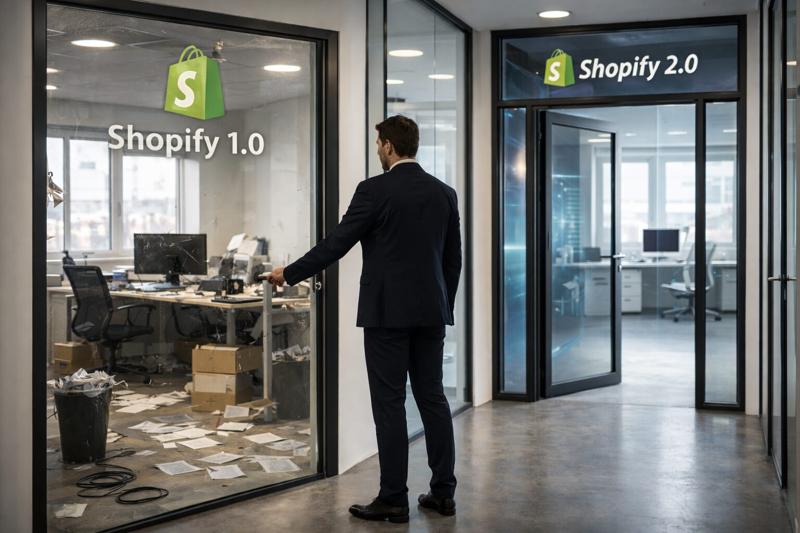

Most ecommerce brands don't have a growth problem. They have a stack problem.
Open your Shopify admin, then your card statement. You'll likely find 20 to 40 apps billing monthly, a copywriting freelancer, a translation agency, a support outsourcer, a reporting tool nobody fully trusts, and a dev retainer for small fixes. Each line looked reasonable when you signed it. Together, they're often the second-biggest cost after inventory and ads.
In 2027, a large share of that work can be done inside your business — by AI tools wired into your own processes, run by the team you already have. Not by replacing people, but by replacing the providers and apps that sit between your team and the result.
This guide covers:
- Why the economics of AI flipped in the last 18 months
- Where the hidden costs sit in a typical Shopify stack
- 10 provider and app categories you can bring in-house with AI
- A simple framework to decide what to keep, replace or rebuild
- Where outsourcing still wins
The goal is simple: do more, with fewer vendors, for less.
Why 2027 is the tipping point
Until recently, "using AI" meant pasting prompts into a chatbot and copying the answer somewhere else. Useful, but it didn't remove a single invoice. Three things changed that.
1. AI now acts, not just answers. Agents can read your store data, call APIs, edit files and run multi-step jobs end to end. A task that needed a freelancer and a brief now needs a well-written process and a review step.
2. Your tools are connected. Through MCP connectors and native integrations, AI assistants plug straight into Shopify, Klaviyo, Google Workspace, Notion, Slack and your helpdesk. The "glue" work that used to justify a middleware app or a VA disappears.
3. Shopify built it into the admin. Since the Winter '26 Edition, Sidekick can generate admin apps, build workflows, customise themes and edit product photos from plain-language prompts. Some of the single-purpose apps you pay for monthly can now be a prompt inside the platform you already pay for.
Adoption is already mainstream: 75% of Shopify store owners use AI tools, mostly for content. The gap now isn't access to AI — it's turning AI use into a lower cost base.
The hidden cost stack
A $1M–$5M brand typically spends $1,000–$3,500 a month on apps alone — before a single freelancer or agency invoice. That spend grows fast with revenue:
| Annual revenue | Typical app count | Typical monthly app spend |
|---|---|---|
| Under $1M | 3–5 | $50–$300 |
| $1M–$5M | 6–9 | $1,000–$3,500 |
| $5M–$20M | 10–12 | $5,000–$15,000 |
| $20M–$100M | 12–18 | $20,000–$80,000 |
Source: Eightx, 2026 app spend by revenue band. High-traffic stores run even heavier stacks: a Koala Apps snapshot of 300 top stores found a median of 14 apps and a modelled median spend of about $11,400 a month.
Apps are only the visible layer. Most brands also pay for:
- Content providers — product copy, blog posts, SEO briefs, ad variations
- Translation agencies — per-word fees for every new market
- Support outsourcing — tier-1 tickets, order tracking, returns
- Reporting and analytics — dashboards, BI seats, a part-time analyst
- Creative studios — retouching, lifestyle shots, banner resizes
- Dev retainers — hours burnt on small theme edits and data fixes
- Virtual assistants — copy-pasting between tools
Each of these is a process with inputs, rules and outputs. That's exactly the kind of work AI now runs well.
10 providers and apps you can bring in-house with AI
| What you pay for today | What replaces it | Who runs it |
|---|---|---|
| Product copy freelancer | Brand-voice AI workflow fed by your PIM/metafields | Ecommerce manager |
| Translation agency / app | AI translation + glossary + native spot-check | Market owner |
| Tier-1 support outsourcing | AI agent on your helpdesk with order data access | Support lead |
| Reporting tool / analyst hours | AI querying Shopify and GA4 directly | Founder / ops |
| Product data entry VA | AI enrichment and bulk updates via the Admin API | Merchandiser |
| Retouching and resizing studio | AI image editing in Shopify and design tools | Content team |
| Email copy agency | AI-drafted flows and campaigns in Klaviyo | CRM manager |
| Small single-purpose apps | Build a tool dashboard where your tools live and run | Dev partner, once |
| Manual QA before launches | Automated AI checks on themes and listings | Dev / ecommerce |
| Inbox and admin VA | AI triage, drafting and filing across tools | Everyone |
1. Product descriptions and SEO copy
Write your brand voice, banned words and structure once. Feed AI the product attributes from your metafields and generate copy, meta titles and alt text in bulk. A human edits the first batch, then spot-checks. The freelancer per-SKU fee goes away; your voice gets more consistent, not less.
2. Translations and new markets
Per-word agency fees punish expansion. AI translation with a shared glossary (sizes, materials, brand terms) gets you most of the way; a native speaker reviews key pages instead of translating every line. New markets go live in days, not weeks.
3. Tier-1 customer support
"Where is my order?", returns and sizing questions are most of the ticket volume. An AI agent connected to your order data answers them instantly and hands off anything sensitive. Your team keeps the conversations that build loyalty; the outsourcer contract shrinks or ends.
4. Reporting and analytics
Instead of a BI seat and a weekly report someone builds by hand, ask questions in plain language against Shopify and GA4. Shopify cites a merchant that cut weekly reporting time by over 80% with Sidekick.
5. Product data and catalogue operations
Bulk tagging, filling metafields, fixing variants, cleaning collections: tasks typically handed to a VA or billed as dev hours. An AI agent working through the Admin API does them in minutes with a log of every change.
6. Product imagery and creative variants
Background removal, resizing for every channel, colour variants and banner adaptations no longer need a studio. Keep the photographer for hero shoots; bring the production work in-house.
7. Email and lifecycle marketing
AI drafts flows, subject-line tests and campaign copy directly from your calendar and product data. Your CRM manager becomes an editor and strategist instead of waiting on an agency's turnaround.
8. Single-purpose apps
Countdown banners, custom fields, simple bundles, internal admin tools — many apps solve one small problem for a monthly fee forever. Sidekick can now generate admin apps, and a developer with AI can build a lightweight custom app or theme section once, with no recurring bill and no extra script on your storefront.
9. QA and launch checks
Broken links, missing translations, wrong prices, accessibility issues, theme regressions: AI-driven checks run before every launch instead of a manual click-through or an external QA service.
10. Inbox, admin and the "glue" work
Supplier emails, invoice filing, meeting notes, copying data between tools. Connected AI assistants triage, draft and file across Gmail, Notion and Slack. This is the least glamorous category — and often the biggest time saving.
Bring it all together: one internal dashboard
The real step change isn't ten separate AI tools. It's putting all of them in one internal dashboard your team opens every morning.
Instead of logging into a dozen apps and provider portals, everyone works from a single place built around how your business runs:
- One login, every tool — content generation, support, reporting, catalogue updates, QA and admin workflows side by side
- Role-based access — each person sees and runs only what their role needs. Owners see costs and performance, managers approve and publish, team members run daily tasks, and freelancers or partners get limited, temporary access
- Connected to your data — Shopify, Klaviyo, your helpdesk and Google Workspace feed the same dashboard, so nobody copies data between tools
- Built around your frictions — every tool exists because it removes a specific bottleneck your team actually had, not because an app store suggested it
That's the difference between buying software and owning a process. An off-the-shelf app solves the average merchant's problem. A tailor-made dashboard answers your team's problems directly — and its cost doesn't grow every time you add a seat or a feature tier.
What it could look like
Here's an example of how an internal tools dashboard for an ecommerce brand might look:
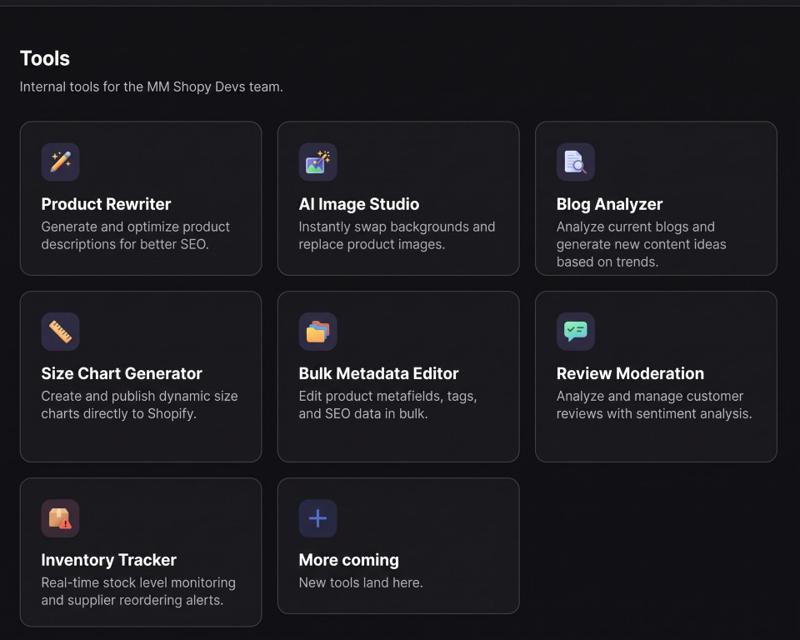
| Tool | What it does | What it can replace |
|---|---|---|
| Product Rewriter | Generates and optimises product descriptions for SEO | Copywriting freelancer, AI copy apps |
| AI Image Studio | Swaps backgrounds and replaces product images | Retouching studio, background-removal apps |
| Blog Analyzer | Analyses current blogs and suggests new content ideas based on trends | Content strategy retainer, SEO research tools |
| Size Chart Generator | Creates and publishes dynamic size charts directly to Shopify | Size chart apps |
| Bulk Metadata Editor | Edits metafields, tags and SEO data in bulk | Bulk editor apps, data-entry VA |
| Review Moderation | Analyses and manages reviews with sentiment analysis | Manual review triage, analysis add-ons |
| Inventory Tracker | Monitors stock in real time and sends supplier reorder alerts | Inventory alert apps, manual stock checks |
Every card is a tool built for one specific friction, and every person sees only the tools their role needs. When a new bottleneck shows up, a new tool lands in the dashboard — no new subscription, no new login.
How to audit your stack: keep, replace or rebuild
Start with the bill, not the technology. Five steps:
- List every recurring cost. Apps, SaaS seats, freelancers, agencies, retainers. Add the monthly cost and the internal hours each one still needs.
- Map each one to a process. Write what goes in, what rules apply and what comes out. If you can't describe it, you can't automate it — or cancel it.
- Score it on two questions. Is the work repeatable with clear rules? Is it core to your brand or customer experience?
- Decide. Use the table below.
- Pilot one, measure, then scale. Run the in-house version alongside the provider for one cycle. Compare cost, time and quality before cancelling.
| Repeatable with clear rules? | Core to the brand? | Decision |
|---|---|---|
| Yes | No | Replace — bring in-house with AI now |
| Yes | Yes | Rebuild — in-house with AI plus human review |
| No | Yes | Keep — invest in the provider or the people |
| No | No | Question it — you may not need it at all |
Most brands find their first quick wins in the "Replace" row: reporting, data entry, translations and tier-1 support.
What not to replace
Cutting providers is only a saving if quality holds. Keep paying experts where judgement, liability or originality is the product:
- Brand strategy and creative direction — AI scales a voice; it doesn't invent one worth scaling.
- Hero photography and campaigns — the shoots that define how your brand looks.
- Legal, tax and compliance — use AI to prepare, not to sign off.
- Complex development — checkout logic, integrations, migrations and performance. AI speeds up good developers; it doesn't replace architecture.
- Payments, fraud and infrastructure apps — where reliability and liability matter more than the monthly fee.
The rule of thumb: replace the production, keep the judgement.
How MM Shopy Devs helps
Knowing what to cut is the easy part. Rebuilding the process so your team can run it without the provider is where most brands stall.
At MM Shopy Devs our Shopify AI consultancy optimises internal processes for Shopify brands to reduce time and costs. We:
- Audit your stack — apps, providers and manual workflows — and show where the money and hours go
- Design the in-house process with AI at the centre and humans at the review points
- Build what's missing — custom apps, theme sections, automations and AI connectors to your store data, all in one internal dashboard with role-based access
- Train your team so the new process runs without us
The result: fewer vendors, fewer apps slowing down your storefront, and a team that does more with the same headcount.
Book a free stack review call and we'll map your first three quick wins.